
Free core tracking. Core lists and transactions have no count limit.
A hobby budget compares your spending plan with what you have recorded. Start with a monthly limit, record your purchases, and check Today before your next buy. Core collector budgeting and activity tracking are available on Free. Pro adds seller tools; you do not need Pro to follow these steps.
Set your monthly limit
- On Today, tap Set a monthly budget if no budget is set, or Edit budget to change an existing limit. You can also open Settings → Budget Settings.
- Enter your Monthly budget and tap Save.
- Under Budget tracking, choose Total or By category. Your monthly total and category amounts remain independent.
- Return to Today and check Purchases and Left this month before buying.
Enter 0 for no overall limit. Today then shows No budget set and your recorded purchases, rather than presenting a remaining allowance. You can continue recording activity and set a limit later. Setting a limit does not move or reserve money.
Record purchases and sales separately
From Today, tap Add purchase. Enter the full Amount paid and choose the Purchase category. Open Show date and notes to check Date, especially when entering an older purchase. Save the purchase after reviewing it. The date starts as today; choose the date the transaction happened rather than the date you happen to enter it. The date picker does not offer future transactions.
For a sale, open History, tap Add activity, and choose Sale. Enter Sale amount, choose the relevant category, check Date, and save. A $40 purchase and a later $25 sale are two records; do not replace them with a $15 purchase. Open a saved activity row to review or correct its details.
Read the numbers
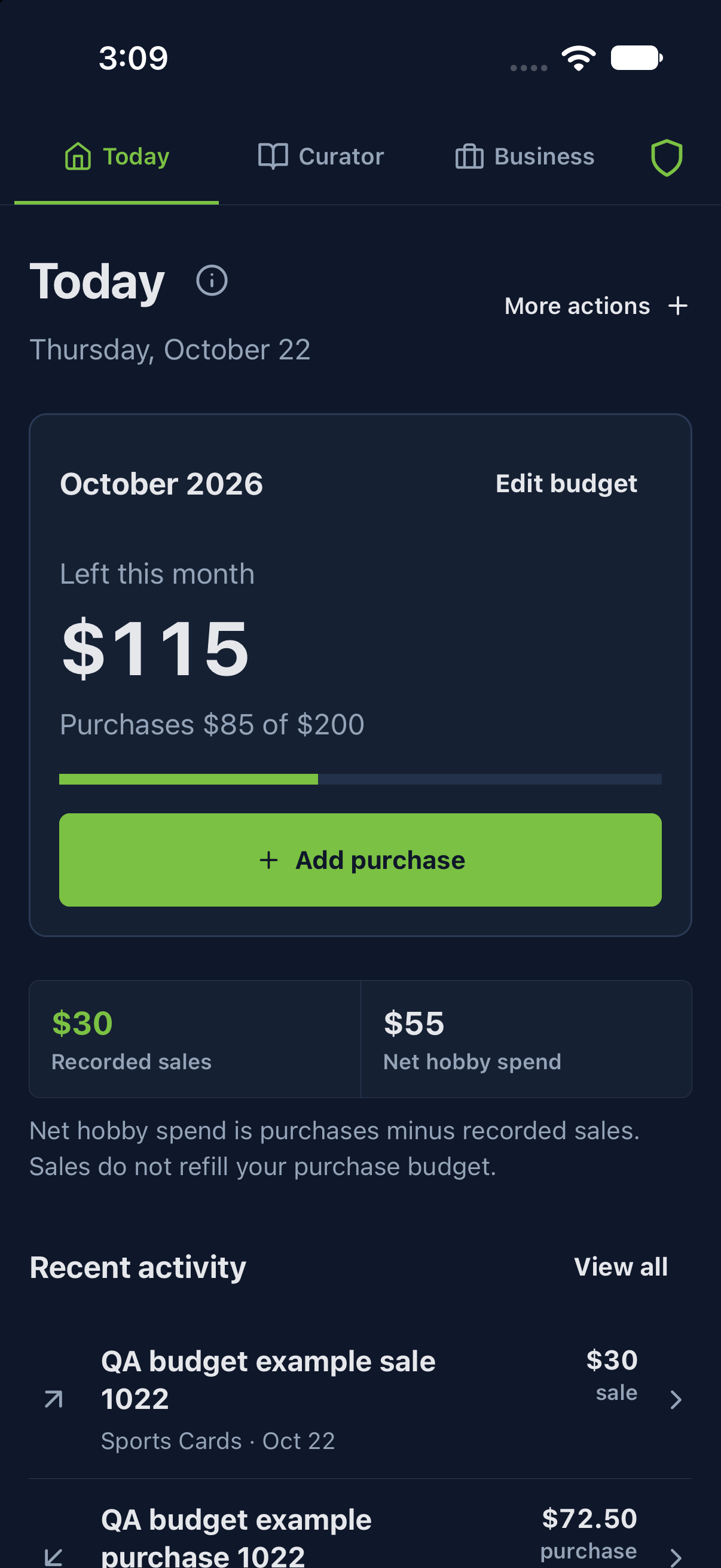
Purchases is recorded purchase outlay. Left this month is the monthly budget minus purchases. Recorded sales shows recorded sale amounts. Net hobby spend is purchases minus recorded sales. Sales do not refill the purchase budget.
With a $200 monthly limit, $85 in purchases and $30 in recorded sales:
- Left this month: $115 — $200 minus $85.
- Net hobby spend: $55 — $85 minus $30.
The $30 sale does not change the $115 left. Net hobby spend is not seller profit, cash in your bank account, or collection value. It does not calculate item cost, fees, shipping or operating expenses for you. Use the relevant Pro seller records and reports when you need those economics; an unknown cost is not zero cost.
If purchases exceed a positive monthly limit, Today shows Over budget and the amount over it. For example, $230 in purchases against a $200 limit is $30 over budget. This is a planning signal, not a payment block. HobbyWise cannot stop purchases outside the app.
Category budgets
Open Budget Settings → Category allocations to divide your plan among the collectible types you want to track. Enter their monthly amounts, review Allocated and the balance against Monthly total, then tap Save. Choose By category under Budget tracking to display the category-allocation summary on Today.
A $200 monthly total with $160 assigned leaves $40 unallocated. Category amounts do not automatically change the monthly total, and saving a new monthly total does not rewrite category amounts. Unallocated money is part of your plan, not a separate transaction or account balance.
If categories total $230 against a $200 monthly total, the plan is $30 overallocated. Adjust the allocations or deliberately keep them as independent category limits. Overallocated describes the plan; over budget describes actual purchases above a limit. Neither state means the other has happened. With a monthly total of 0, category allocations can remain in place while there is no overall limit.
Check the period and event inclusion
Today uses the current calendar month on your device. Purchase and sale dates determine their period. Changing Report period → Monthly / Annual in Budget Settings does not turn Today into an annual balance. Reports offers the current month or current year; check the selected period and category before comparing totals. The limits you enter in Budget Settings and Category allocations are monthly amounts.
For an event, review Include in monthly budget. Activity recorded through an included event is linked into your regular activity records; event-only activity is kept separate when that option is off. Included event activity uses its recorded activity date, not simply the event's scheduled start date. An event spending plan is not a purchase and does not reserve money. Review the event's inclusion setting and recorded entries if the numbers differ from what you expected.
Count a whole buy once
If you record a whole collection buy, its cash outlay belongs in purchases once. HobbyWise's monthly purchase calculation includes a recorded whole-buy outlay when no linked purchase already represents it. A linked purchase represents that buy instead; allocating its cost among selected inventory copies does not create another cash purchase.
For a $120 lot with $80 allocated to selected copies, the cash outlay is still $120. The remaining $40 is unallocated cost, not another purchase. Avoid entering an unrelated duplicate purchase for the same lot: the connection between records is what identifies a linked buy, not matching amounts alone.
Get help without leaving your work
Tap the circled i beside the feature title for bundled instructions. Close returns you to your work. Read the full guide opens this article. The essential in-app instructions remain available offline; opening the website needs a working connection.
To hide or restore these buttons, use Settings → Feature information buttons. This preference does not disable budgeting or erase your records.
Worked examples are fictional. Follow the controls available in your release and account.
Need help? Open HobbyWise support or review your 5Line Account.